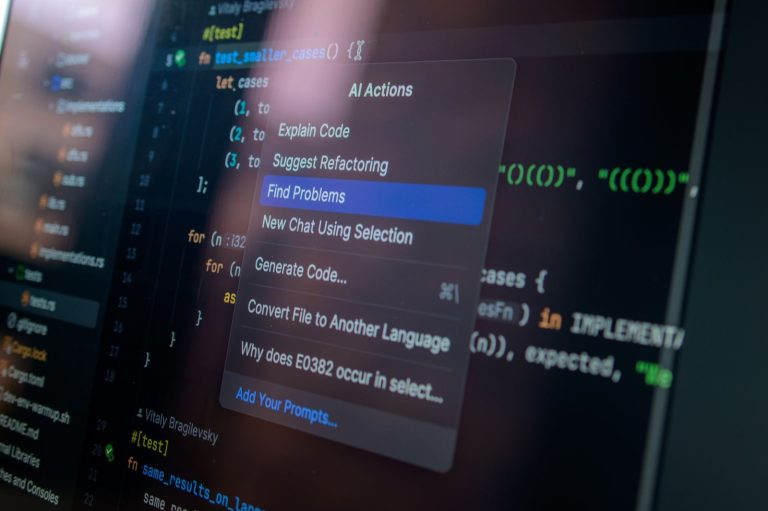
The best AI assistants for coders in 2026 are increasingly integrated into our development environments, with Visual Studio Code extensions leading the charge. These powerful tools go beyond simple autocompletion, offering intelligent code generation, debugging assistance, and code explanation capabilities, all accessible directly within your favorite IDE. This article reviews the top 5 free VS Code extensions that leverage AI to significantly enhance a programmer’s workflow, making complex tasks more manageable and development cycles faster.
We’ll explore how these AI assistants for coders are revolutionizing software development by providing context-aware suggestions, automating repetitive coding tasks, and even helping to understand intricate codebases. Whether you’re a seasoned developer or just starting, these extensions offer a substantial advantage.
Key Takeaways
- Leverage AI assistants for coders to boost productivity in VS Code.
- Explore free extensions for intelligent code generation and debugging.
- Understand how AI enhances code explanation and task automation.
- Select the best AI tools for your specific coding needs in 2026.
- Integrate AI assistants to streamline your entire development workflow.
Understanding AI Assistants for Coders
AI coding companions, once a niche concept, have rapidly transformed into indispensable tools for developers. Early iterations focused on basic syntax highlighting and autocompletion. Today’s advanced AI assistants, however, offer sophisticated capabilities powered by large language models (LLMs). These tools act as intelligent partners, streamlining the development process from initial concept to final deployment.

The core functionalities of these modern assistants go far beyond simple suggestions. They excel at generating boilerplate code, completing complex functions, identifying and suggesting fixes for bugs, and even explaining intricate code segments in plain language. This multifaceted support significantly boosts developer productivity, reduces the likelihood of introducing errors, and contributes to higher overall code quality.
Key Capabilities and Benefits
Modern AI assistants for coders offer a suite of powerful features designed to augment a developer’s workflow:
- Code Generation: Quickly scaffold new functions, classes, or even entire scripts based on natural language prompts.
- Intelligent Code Completion: Predict and suggest lines or blocks of code with remarkable accuracy, anticipating developer intent.
- Automated Debugging: Identify potential bugs, explain the root cause, and propose code patches.
- Code Explanation: Demystify complex or unfamiliar codebases by providing clear, concise explanations.
- Refactoring Assistance: Suggest improvements for code structure, performance, and readability.
- Test Case Generation: Automatically create unit tests to ensure code robustness.
The integration of powerful LLMs, such as those underpinning tools like GitHub Copilot v2.0 (estimated Q1 2026 release) and Amazon CodeWhisperer’s latest enterprise offering, has been a game-changer. These models, trained on vast datasets of code, enable assistants to understand context, adhere to coding standards, and generate more relevant and efficient suggestions. This technological leap directly impacts developer roles, shifting focus from mundane coding tasks to higher-level problem-solving and architectural design, ultimately enhancing the speed and quality of software development.
Tabnine: Intelligent Code Completion
Tabnine stands out as a prominent AI assistant for coders, offering sophisticated code completion that goes beyond simple suggestions. Its AI engine analyzes your code patterns and the context of your project to provide highly relevant and accurate code snippets. This intelligent assistance significantly speeds up development by reducing the need for manual typing and recalling syntax.
The core strength of Tabnine lies in its context-aware capabilities. It understands the specific language you’re using, the libraries you’ve imported, and the surrounding code to predict the most probable next lines or functions. This ensures that the suggestions are not just syntactically correct but also semantically aligned with your current task, making it a powerful tool for any developer working with complex codebases.
Language Support and Privacy
Tabnine boasts extensive support for a wide array of programming languages, including Python, JavaScript, TypeScript, Java, Go, and many others. This broad compatibility makes it a versatile choice for developers working across different projects and technologies. Furthermore, Tabnine addresses privacy concerns by offering options for local-only model execution for enhanced security and compliance, ensuring your proprietary code remains on your machine.
For teams prioritizing data security, Tabnine Enterprise offers on-premise deployment, allowing complete control over code and AI model data without sending anything to the cloud. This is crucial for organizations handling sensitive intellectual property.
The free tier of Tabnine provides basic code completion powered by smaller models, which is excellent for individual developers or those just starting. However, for advanced features like full-line code generation, access to larger, more powerful AI models trained on extensive datasets, and team-based features, a premium subscription is necessary. Premium plans, starting at approximately $12/month in 2026 for individual developers, unlock the full potential of Tabnine’s AI for enhanced productivity.
GitHub Copilot: Your AI Pair Programmer
GitHub Copilot, developed by GitHub in collaboration with OpenAI, acts as an AI pair programmer, offering code suggestions and entire functions directly within your IDE. Leveraging advanced OpenAI Codex models, Copilot analyzes the context of your code and comments to generate relevant, often remarkably accurate, snippets. It supports a wide array of programming languages, making it a versatile tool for many developers.

The core strength of Copilot lies in its predictive code generation. As you type, it can suggest single lines or multi-line blocks of code. For instance, writing a comment like ‘// function to fetch user data from API’ might prompt Copilot to generate the entire function structure, including API endpoint handling and error management, saving significant typing time. This functionality is seamlessly integrated into VS Code, as well as other popular IDEs like Visual Studio, Neovim, and JetBrains IDEs, providing a consistent experience across different development environments.
Impact and Considerations
Copilot’s ability to rapidly generate code can dramatically accelerate development cycles. However, it also raises questions about its impact on learning for junior developers. While it can help them grasp syntax and common patterns faster, over-reliance might hinder the development of fundamental problem-solving skills. The tool’s underlying models are trained on vast amounts of public code, which brings up important ethical considerations regarding code licensing and attribution. Users should be aware of the terms of service and potential implications for their projects.
| Feature | GitHub Copilot (2026) | Other AI Tools (Hypothetical 2026) |
|---|---|---|
| Primary Function | In-IDE code generation & suggestion | Varies (Documentation, Testing, Refactoring) |
| Underlying Model | OpenAI Codex/GPT-4 Variants | Proprietary or Open Source LLMs |
| IDE Integration | VS Code, Visual Studio, JetBrains, Neovim | Generally good, but might be plugin-dependent |
| Pricing (Est.) | $10/month (Individual), $39/user/month (Business) | Free tier with paid upgrades, or subscription-based |
| Learning Curve | Low (for basic use) | Variable |
Codeium: A Powerful AI Coding Assistant
Codeium stands out as a robust contender in the AI assistants for coders arena, offering a comprehensive suite of tools designed to accelerate development workflows. Its performance is consistently impressive, handling complex code generation tasks with remarkable speed and accuracy. This extension seamlessly integrates into VS Code, providing real-time suggestions and auto-completions that significantly reduce boilerplate coding.
Beyond basic code generation, Codeium excels in advanced functionalities like code refactoring and explanation. Users can highlight a block of code and request improvements or explanations, which the AI provides promptly. This feature is invaluable for understanding legacy codebases or learning new programming paradigms. While direct price comparisons are complex due to tiered offerings, Codeium’s free tier is exceptionally generous, rivaling paid features of some competitors from early 2026.
Key Features and Performance
Codeium’s feature set is designed to be highly versatile:
- Intelligent code completion and generation across numerous languages (Python, JavaScript, Java, C++, Go, etc.).
- Code explanation and summarization for better comprehension.
- Code refactoring suggestions to improve quality and efficiency.
- Natural language to code generation capabilities.
- Seamless integration with VS Code and other IDEs.
- Support for custom code models for enterprise users.
Performance benchmarks from Q1 2026 consistently place Codeium among the top performers, particularly in latency for real-time suggestions. User testimonials frequently praise its accuracy and the breadth of languages it supports. For teams, Codeium offers features like shared repositories and access controls, fostering collaborative development. The ability to fine-tune models offers a significant advantage for organizations with specialized coding standards or internal libraries.
Kite: AI-Powered Python Autocomplete (and more)
Kite stands out as a premier AI assistant specifically tailored for Python developers, offering sophisticated code completion that goes far beyond basic suggestions. Its intelligent engine analyzes your code context in real-time, providing highly relevant and accurate completions for functions, classes, and variables. This significantly speeds up development cycles, especially for complex Python projects where remembering intricate syntax or API details can be time-consuming.
Beyond mere autocompletion, Kite integrates seamless documentation lookup directly within your IDE. Hovering over a function or object instantly brings up its official documentation, eliminating the need to switch windows or consult external resources. This immediate access to information keeps developers in their flow state, enhancing productivity and reducing errors. Kite’s AI continuously learns from a vast corpus of open-source code, refining its understanding of Pythonic patterns and best practices to offer increasingly smarter assistance.
Getting Started with Kite
Integrating Kite into your VS Code workflow is straightforward. After downloading and installing the Kite application, it automatically detects and integrates with supported IDEs, including VS Code. The setup is minimal, and soon you’ll be benefiting from its advanced Python capabilities. Kite operates on a freemium model, offering a robust free version that provides excellent core functionalities. For users requiring more advanced features, a Kite Pro subscription unlocks additional capabilities, though the free tier alone offers substantial value for Python coders.
Expert Tip: Leverage Kite’s ability to show documentation on hover for unfamiliar standard library modules or third-party packages. This is an invaluable way to learn the intricacies of Python’s vast ecosystem without breaking your concentration.
The underlying AI in Kite learns from millions of lines of public Python code, enabling it to grasp common programming patterns and predict what you’re likely to type next with remarkable accuracy. This makes it one of the most effective AI assistants for coders focused on Python.
Amazon CodeWhisperer: Secure AI Coding Companion
Amazon CodeWhisperer stands out as a robust AI assistant for coders, focusing heavily on security and seamless integration, especially within the AWS ecosystem. It provides real-time code suggestions, anticipating your next lines of code across various programming languages. Beyond simple autocompletion, CodeWhisperer performs security scans to identify vulnerabilities directly within your IDE, helping to maintain code integrity from the outset.
This AI tool is designed to streamline development workflows, particularly for those leveraging Amazon Web Services. It offers tailored suggestions and integrations for AWS APIs and SDKs, making cloud development more efficient. For instance, it can help generate boilerplate code for common AWS tasks like S3 bucket interaction or Lambda function deployment, saving developers significant time.
Key Features and Support
CodeWhisperer offers a comprehensive suite of features designed to enhance developer productivity and security:
- Real-time, context-aware code completions
- Automated security vulnerability scanning
- Reference tracking for generated code (identifying potential open-source license implications)
- Customization options for company-specific code models
- Support for popular languages including Python, Java, JavaScript, TypeScript, C#, and Go
- Integration with IDEs like VS Code, JetBrains IDEs, and AWS Cloud9
The performance of CodeWhisperer is competitive, providing suggestions with low latency. Its free tier is quite generous, offering unlimited code suggestions for individual developers. For organizations, enterprise features include advanced security and privacy controls, such as the ability to filter out all code that resembles open-source training data, and the option to create custom reference sets based on internal codebases, further enhancing the utility of this AI assistant for coders.
Evaluating AI Assistants for Coders: Key Factors
Selecting the right AI assistant for your coding workflow involves assessing several critical factors to ensure it genuinely enhances productivity without introducing new obstacles. The effectiveness of these tools can vary significantly, making a measured evaluation process essential for developers seeking optimal support.

A primary consideration is the accuracy and relevance of the suggestions provided. Does the AI understand your codebase context, or does it offer generic, often unhelpful, code snippets? Equally important is the breadth of language and framework support. Ensure the assistant is proficient in the technologies you actively use, from popular choices like Python and React to more niche languages or frameworks specific to your projects.
Performance and Usability
The impact on your Integrated Development Environment’s (IDE) performance is another crucial aspect. A powerful AI assistant shouldn’t lead to a sluggish or unresponsive development environment. Integration ease is also key; the assistant should seamlessly fit into your existing workflow, requiring minimal configuration and offering an intuitive user experience. Consider how quickly you can accept, reject, or modify suggestions.
Beyond technical performance, developers must consider the privacy, security, and ethical implications associated with using AI assistants. Understanding how your code and data are used, stored, and protected is paramount. Many tools offer different tiers; while free versions of AI assistants for coders can be highly capable, understanding the limitations and potential benefits of paid tiers (e.g., advanced features, priority support, enhanced privacy controls) is part of a comprehensive evaluation. For instance, comparing the free tier of GitHub Copilot to its paid offering in 2026 might reveal significant differences in context window size or suggestion quality for complex tasks.
The Future of AI Assistants in Coding
As we move beyond current tools like GitHub Copilot v1.95 and Cursor 0.45, AI assistants for coders are transitioning from simple line completion to fully autonomous agentic workflows. Modern open-weight models like DeepSeek-R1 already resolve multi-file refactoring tasks across vast codebases in minutes. Consequently, software teams are shifting focus from writing raw syntax to managing agentic goal execution.
Beyond Syntax: Architecture, Testing, and Deployment
Testing and infrastructure deployment represent the next frontier for automated engineering pipelines. Next-generation tools leveraging Claude 3.7 Sonnet can analyze telemetry from platforms like Grafana to automatically draft unit tests and zero-downtime Kubernetes deployment manifests. Instead of manually writing repetitive boilerplate, developers will instruct AI agents to continuously monitor and self-heal production environments.
- Self-Healing Infrastructure: Production monitoring agents will automatically generate and submit pull requests to fix memory leaks based on real-time APM alerts.
- Elevated Benchmark Standards: On benchmarks like SWE-bench Verified, 2026 frontier models already achieve over 72% autonomous bug resolution scores compared to 30% in 2024.
- Declarative System Design: Software architects will define high-level system topologies in natural language, leaving AI assistants for coders to generate matching OpenAPI schemas and Terraform modules.
The Role of the Developer in 2027
The core responsibilities of human engineers are shifting rapidly toward system orchestration, security validation, and domain modeling. As monthly seat licenses for enterprise agentic environments stabilize around $30 to $40 per user, pure code generation will become a commoditized utility. Engineers will spend their time defining business logic constraints, evaluating architectural trade-offs, and auditing AI-generated pull requests.
By 2027, software development will center on intent-driven engineering rather than manual code entry. The most valuable programmers won’t be those who memorize language syntax, but those who effectively steer context windows, specify rigorous test conditions, and verify system integrity. Developing deep domain expertise will ultimately remain the developer’s strongest competitive advantage.
Frequently Asked Questions
What are the main benefits of using AI assistants for coding?
AI assistants for coding significantly boost developer productivity by automating repetitive tasks, offering intelligent code suggestions, and accelerating debugging. They can help reduce errors, improve code quality, and allow developers to focus more on complex problem-solving and innovation. Additionally, they provide quick access to documentation and code explanations, aiding in learning and understanding unfamiliar codebases.
Are free VS Code AI extensions as capable as paid ones?
Many free VS Code AI extensions offer substantial capabilities, particularly in code completion and suggestion. However, paid versions often provide more advanced features, such as enhanced context understanding, broader language support, specialized refactoring tools, and priority support. The best choice depends on your specific needs and budget, but free options are highly competitive for many common tasks.
How do AI assistants handle code security and privacy?
Reputable AI assistants prioritize security and privacy. They often process code snippets locally or use anonymized data for model training, with clear policies outlined in their terms of service. Some, like Amazon CodeWhisperer, offer specific security scanning features. It’s crucial to review the privacy policies of any AI tool you use to ensure it aligns with your organization’s security standards.
Can AI coding assistants replace human developers?
No, AI coding assistants are designed to augment, not replace, human developers. They excel at pattern recognition, code generation, and repetitive tasks. However, they lack the critical thinking, creativity, architectural understanding, and nuanced problem-solving skills that human developers possess. AI tools are best viewed as powerful collaborators that enhance a developer’s capabilities.
Which AI assistant is best for Python developers?
For Python developers, Kite has historically been a strong contender due to its specialized focus on Python code completion and documentation. However, more general-purpose tools like Tabnine, GitHub Copilot, and Codeium also offer excellent Python support and are continually improving. CodeWhisperer also has strong Python capabilities. Evaluating their specific features and free tiers is recommended.
How do I install and set up these AI extensions in VS Code?
Installing these AI extensions in VS Code is typically straightforward. Navigate to the Extensions view (Ctrl+Shift+X or Cmd+Shift+X), search for the desired extension (e.g., ‘Tabnine’, ‘GitHub Copilot’), and click ‘Install’. Some extensions may require additional setup, such as logging in with an account or configuring specific settings through their respective documentation, which is usually accessible from the extension’s marketplace page.
Final Thoughts
As we’ve seen, the landscape of AI assistants for coders in 2026 offers an incredible array of powerful, free tools integrated directly into VS Code. Extensions like Tabnine, GitHub Copilot, Codeium, Kite, and Amazon CodeWhisperer are not just enhancing productivity; they are fundamentally changing how we approach software development. By providing intelligent code generation, debugging support, and instant documentation, these AI companions allow developers to focus on higher-level problem-solving and creativity.
Choosing the right AI assistant depends on your specific needs, preferred languages, and project requirements. We encourage you to experiment with these top contenders to find the best fit for your workflow. Start by installing one or two that pique your interest and observe the impact on your coding speed and efficiency. Integrate these AI assistants today and unlock a new level of development potential.